New: the Top 10 Non-Repainting MT4 Indicator Pack is free to download

98 free indicators for MetaTrader 4 & 5

Price Action Scanner Indicator MT4

Free MT4 download: Price Action Scanner auto-marks Pin Bar, Rails, OVB, PPR, Wide Range Bar, and double-top/bottom candle patterns as colored rectangles. Free download, link emailed in seconds.

MT4Non-repaintingPattern Recognition
Data Windowprice-action-scanner-mt4
PlatformMT4 Build 600+
File.mq4 / .ex4 in .zip
Version1.0
Size9.7 KB
RepaintsNo
TypePattern Recognition
UpdatedSep 6, 2026
DownloadsNew listing
Download free (9.7 KB)
  • Enter your email, the download link arrives in seconds
  • Free bonus reports on the next page

Indicators are analysis tools, not trade signals. Forex trading on margin carries a high risk of loss. Test on a demo account first.

EURUSD · H4 · previewPrice Action Scanner Indicator MT4 v1.0
Price Action Scanner Indicator MT4 on EURUSD H4Non-repainting
How it works →
Overview

Price Action Scanner is a free, instant-download MT4 indicator that automatically scans your chart history and draws colored rectangles around eleven distinct candlestick price-action setups, so you don’t have to eyeball every bar manually. Each pattern family has its own toggle and its own color, which makes it as much a screening tool as a plotting one.

What It Actually Detects

The indicator works down through candidate patterns in a fixed priority order — the first one that matches a bar wins, so overlapping setups on the same bar don’t get double-tagged. The pattern families, based directly on the detection functions in the code, are:

  • Pin Bar — requires a body that closes very near the candle’s high or low (within closeToHighLowPoints), a shadow at least shadowToBodyKoef times the body size, and a nose that pokes at least noseOutsidePercent% beyond the prior bar’s extreme.
  • Wide Range Bar (WRB) — a three-candle setup where the middle bar’s body is at least BodyRatio times larger than both neighbors, with a minimum HighLowClearance% gap between the outer bars’ high and low.
  • PPR — a three-candle reversal where the current close breaks the prior bar’s opposite extreme, the middle bar makes a lower low (or higher high) than both its neighbors, and the third bar closes against the reversal direction.
  • OVB (outside/engulfing bar) — the current bar’s high and low both exceed the prior bar’s range, with its body direction and close confirming the same side.
  • Rails — two consecutive candles with similarly sized but opposite-colored bodies (within bodyGreatPercents% of each other) where each body is at least bodyToHeightPercents% of its own candle’s total range.
  • TB (twin bar high/low) — a directional bar followed by a run of bars with equal highs (or lows) within equalPipsTB points.
  • DB (double top/bottom) — similar equal-high/equal-low run logic to TB, gated by equalPipsDB, triggered off a directional close through the prior bar’s extreme.

Each detected pattern is stored in an internal array and drawn once as a filled or outlined rectangle (ShowRectangle()) spanning from the pattern’s start bar to its end bar, using the low/high of the pattern’s range.

How to Read the Chart

Each pattern family has its own bull/bear color pair, so you can tell at a glance which setup and which direction triggered just from the rectangle’s color and the input labeled for that family. By default (OverlapingPattern = NO) the scanner won’t draw a new rectangle over a time range that’s already occupied by a previously plotted pattern, which keeps the chart from becoming a wall of overlapping boxes.

Key Inputs

  • indBarsCount (default 1000) — how many bars of history the scanner processes.
  • OverlapingPattern (default NO) — whether a new pattern is allowed to draw over a time range already claimed by an earlier one.
  • equalPipsDB / equalPipsTB (default 3 each) — the point tolerance for two highs or lows to count as “equal” for the DB and TB patterns.
  • bodyGreatPercents (default 10) — maximum percentage difference allowed between two candle bodies for the Rails pattern.
  • bodyToHeightPercents (default 20) — minimum ratio of a candle’s body to its full high-low range, required for Rails.
  • closeToHighLowPoints (default 3) — how close (in points) the close must sit to the candle’s high or low for a Pin Bar.
  • shadowToBodyKoef (default 3.0) — minimum shadow-to-body ratio required for a Pin Bar.
  • noseOutsidePercent (default 75.0) — how far the Pin Bar’s shadow must extend past the prior bar’s extreme.
  • BodyRatio (default 1.5) — how much larger the middle candle’s body must be versus its neighbors for a Wide Range Bar.
  • HighLowClearance (default 20) — minimum clearance percentage between the outer bars for a Wide Range Bar.

Each pattern family also has its own bull/bear color inputs (for example colorBullsPINBAR/colorBearsPINBAR, colorBullsRails/colorBearsRails) so every rectangle can be recolored independently.

Repaint Behavior

The scanner is non-repainting. Its pattern-matching function is only ever invoked on bars that have already fully closed (the recalculation loop deliberately starts at index 1, skipping the still-forming current bar), and every comparison it makes looks at that bar plus older, already-settled bars — never a bar that hasn’t printed yet. Once a rectangle is drawn, its object name is generated from the pattern’s fixed timestamp, and the drawing function explicitly checks whether that name already exists before creating anything, so a pattern is never silently redrawn, moved, or reclassified after the fact.

Limitations

  • This is a screening/marking tool, not a signal generator — it doesn’t rank patterns by quality or tell you which one is the highest-probability setup, and it fires on every historical instance meeting the geometric rules, valid or not.
  • With OverlapingPattern = NO, an earlier lower-priority pattern can block a later, arguably more relevant pattern from being drawn on the same bars.
  • The pattern-priority order is fixed in code (Pin Bar first, then WRB, PPR, OVB, Rails, TB, DB) — you can’t reorder which pattern wins on a contested bar without editing the source.
  • Some threshold defaults (e.g. a 3-point equality tolerance) are tuned to a specific broker’s point size and spread; they may need adjusting for 5-digit brokers or wider-spread symbols.
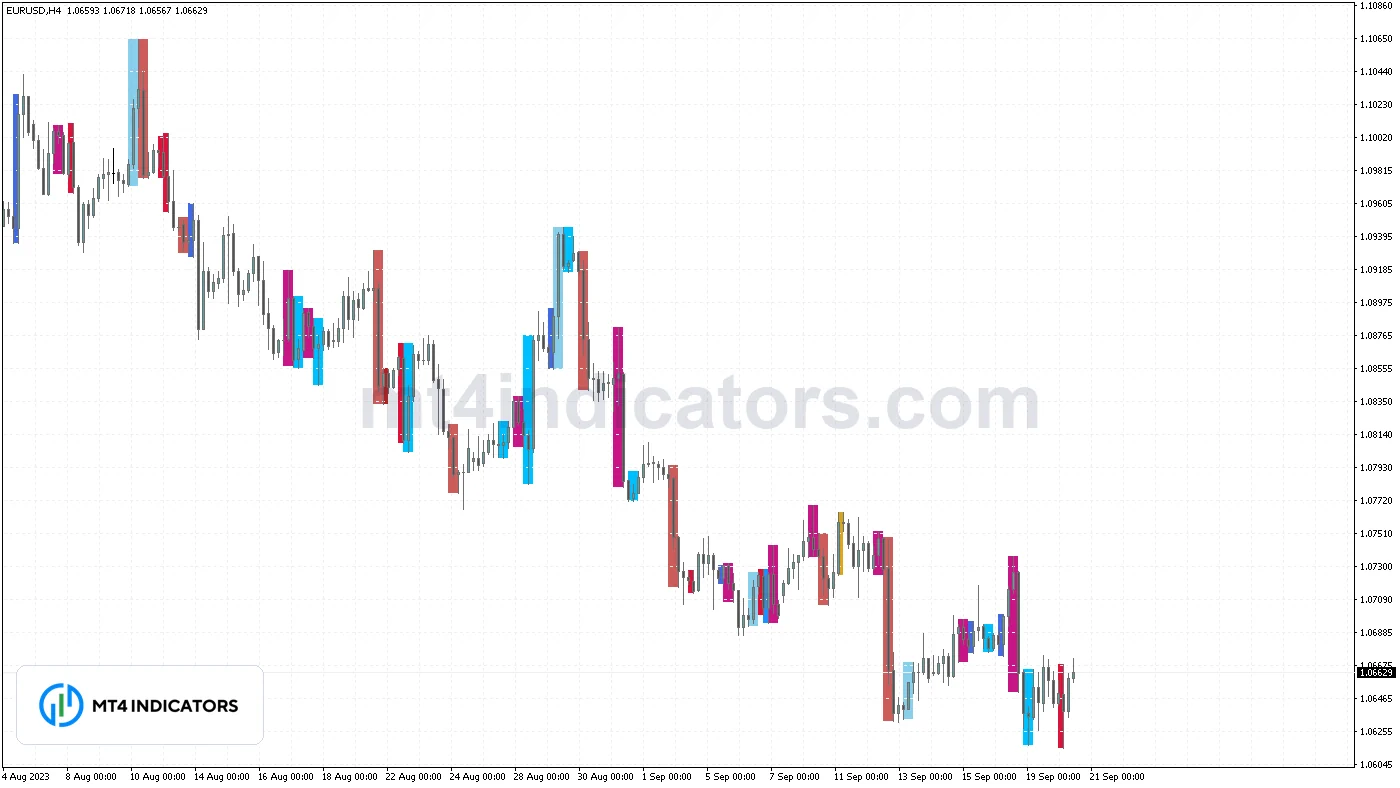
Price Action Scanner Indicator MT4 on an EURUSD H4 MT4 chart

Price Action Scanner Indicator MT4 on a MetaTrader chart. Click to enlarge.

Repaint verdict: does not repaint. We read the source: every value is calculated on closed bars and never rewritten, so what you see in history is what you would have seen live.

Free pack

Get the Top 10 Non-Repainting Indicator Pack

Ten MT4 indicators that draw on closed bars only, in one zip with install notes for each.

Settings

Inputs, defaults and what they change

  • indBarsCount (default 1000) — Number of history bars the scanner processes when looking for patterns.
  • OverlapingPattern (default NO) — Whether a new pattern is allowed to draw over a time range already occupied by a previously plotted pattern.
  • FillRectangle (default YES) — Whether pattern rectangles are drawn filled with color or as outlines only.
  • LineWidth (default 1) — Line thickness of the pattern rectangle borders.
  • showDBpattern (default YES) — Enables detection and drawing of the double top/bottom (DBHLC/DBLHC) pattern.
  • equalPipsDB (default 3) — Point tolerance for two highs or lows to be treated as equal for the DB pattern.
  • showTBpattern (default YES) — Enables detection and drawing of the twin bar high/low (TBH/TBL) pattern.
  • equalPipsTB (default 3) — Point tolerance for two highs or lows to be treated as equal for the TB pattern.
  • IsShowRailsPattern (default YES) — Enables detection and drawing of the Rails pattern.
  • bodyGreatPercents (default 10) — Maximum percentage difference allowed between two candle bodies for a Rails match.
  • bodyToHeightPercents (default 20) — Minimum ratio of a candle's body to its full high-low range, required for Rails.
  • IsShowOVBPattern (default YES) — Enables detection and drawing of the outside/engulfing bar (OVB) pattern.
  • IsShowPPRPattern (default YES) — Enables detection and drawing of the PPR three-candle reversal pattern.
  • IsShowPINBARpattern (default true) — Enables detection and drawing of the Pin Bar pattern.
  • closeToHighLowPoints (default 3) — How close, in points, the close must sit to the candle's high or low for a Pin Bar match.
  • shadowToBodyKoef (default 3.0) — Minimum shadow-to-body size ratio required for a Pin Bar match.
  • noseOutsidePercent (default 75.0) — Minimum percentage the Pin Bar's shadow must extend past the prior bar's extreme.
  • IsShowWRBPattern (default YES) — Enables detection and drawing of the Wide Range Bar (WRB) pattern.
  • BodyRatio (default 1.5) — Minimum size ratio of the middle candle's body versus its neighbors for a Wide Range Bar match.
  • HighLowClearance (default 20) — Minimum clearance percentage between the outer bars' high and low for a Wide Range Bar match.
Install

How to install it in MetaTrader 4

  1. Step 1Download and unzip

    Enter your email, open the download link we send you and extract the .mq4 / .ex4 file from the zip.

  2. Step 2Open the data folder

    In MetaTrader, go to File → Open Data Folder.

  3. Step 3Copy into Indicators

    Place the file in MQL4 → Indicators, then restart MetaTrader or refresh the Navigator panel.

  4. Step 4Attach it to a chart

    Find it under Navigator → Indicators and drag it onto any chart.

First time installing an indicator? Watch the 75-second video or follow the screenshots in our MT4 install guide: every click in MetaTrader, plus fixes for an indicator that won't show up.

Free forex calculators
FAQ

Price Action Scanner Indicator MT4 questions

No. Patterns are only ever detected on fully closed bars, using comparisons against older bars only, and drawn rectangles are keyed to a fixed pattern timestamp so they’re never moved or redrawn once plotted.

Rails is a two-candle pattern requiring two similarly-sized, opposite-colored bodies. TB (twin bar) is a directional bar followed by a short run of equal highs or lows. DB (double top/bottom) uses the same equal-high/equal-low logic as TB but is gated by a directional close breaking the prior bar’s extreme first.

When set to NO (the default), the scanner won’t draw a new pattern rectangle over a time range already occupied by a previously detected pattern, which prevents overlapping boxes but can also suppress a later pattern on the same bars.

The indicator’s own description states 11 candle patterns, drawn from seven detection families in the code: Pin Bar, Wide Range Bar, PPR, OVB, Rails, TB, and DB, each with a bullish and bearish variant.

Not Specified in the code — there’s no hardcoded timeframe or symbol restriction. The default indBarsCount of 1000 bars and point-based tolerances (equalPipsDB, closeToHighLowPoints) were written with standard 4/5-digit forex pricing in mind.

Price Action Scanner Indicator MT4
Size
9.7 KB
Version
1.0
Repaints
No
Download free
Free packTop 10 Non-Repainting Indicators

Ten closed-bar MT4 indicators in one zip.

Get the pack

Price Action Scanner Indicator MT4Free · 9.7 KB

Download

Where should we email your download link?

Use an email you can check right now: the download link goes straight to this inbox.