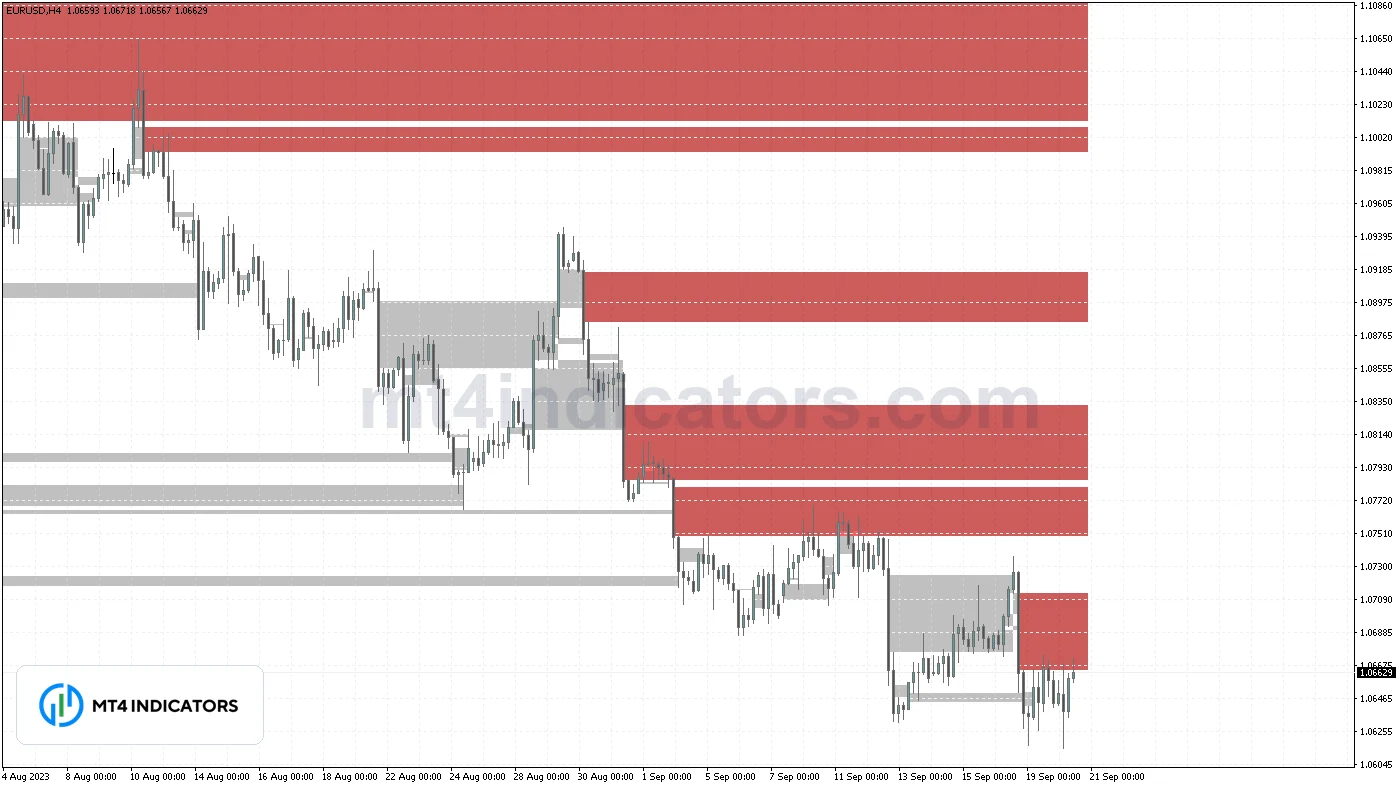
The Fair Value Gap (FVG) indicator for MT4 finds three-candle price imbalances and draws each one as a shaded zone on your chart. A gap is confirmed only when its third candle closes, and the zone then extends to the right until price comes back and fills it, so you can see at a glance which imbalances are still open.
Fair value gaps are a popular concept in price-action and smart-money style trading. This free MetaTrader 4 version keeps the logic simple and transparent: no hidden filters, no recalculated history, just gaps that meet a clear rule and boxes that change color once price has traded back through them.
What Is the Fair Value Gap (FVG) Indicator?
A fair value gap is a stretch of price that was crossed so quickly that it traded on only one side. You see it as three candles in a row where the wicks of the first and third candles do not overlap. The middle candle is usually a large, fast candle, and the empty space between candle one and candle three is the gap.
Many traders treat these gaps as areas price is likely to revisit, and as places where a pullback may find support or resistance. The indicator does not predict that. It simply measures every gap on the chart, marks it, and tracks whether it has been filled, which saves you from drawing and updating dozens of rectangles by hand.
How the indicator calculates a gap
The code looks at three consecutive closed candles. Call the newest one candle 1 (the third candle of the pattern) and the oldest one candle 3.
- Bullish FVG: the low of candle 1 is above the high of candle 3. The zone runs from candle 3’s high (bottom) to candle 1’s low (top).
- Bearish FVG: the high of candle 1 is below the low of candle 3. The zone runs from candle 1’s high (bottom) to candle 3’s low (top).
- The gap must be at least MinGapPoints tall. With the default of 0, any gap larger than zero is drawn.
Each zone starts at the middle candle. The indicator then checks every later candle, including the one currently forming. With RequireFullFill on, a bullish gap is filled when a later low reaches the bottom of the zone, and a bearish gap is filled when a later high reaches the top. With it off, any trade back into the gap counts. Filled gaps turn MitigatedColor and stop extending, or they are removed entirely if ShowMitigated is false.
Only the last MaxBarsBack bars are scanned, which keeps the chart readable and the indicator light. Zones are drawn as filled rectangles behind the candles, so price stays visible.
Key Features
- Detects bullish and bearish three-candle imbalances on closed candles only.
- Zones extend until filled, or to a fixed length you choose.
- Two fill rules: full fill through the gap, or first touch.
- Filled gaps can stay on the chart in a neutral color or disappear.
- Minimum gap size filter in points to ignore tiny gaps on lower timeframes.
- Optional pop-up alert and mobile push notification when a new gap forms.
- All chart objects use the prefix MT4I_FVG_ and are deleted when you remove the indicator.
How to Trade With the Fair Value Gap (FVG) Indicator
An FVG is a zone, not a signal. It works best when you combine it with market structure and a trigger candle. A common approach looks like this.
Buy setup
- Identify an uptrend on your trading timeframe, or on one timeframe higher, using swing highs and lows or a trend tool.
- Wait for a bullish FVG to form during a strong push up.
- Let price pull back into the green zone. Do not buy the moment the gap forms; the idea is to wait for the retracement.
- Look for a confirmation candle inside or at the edge of the zone, such as a bullish engulfing candle or a pin bar with a long lower wick.
- Place the stop below the bottom of the gap, or below the low of the candle that created it, with room for the spread.
Sell setup
Reverse the rules: a downtrend, a bearish FVG left by a strong drop, a pullback up into the red zone, a bearish confirmation candle, and a stop above the top of the gap.
Practical tips
- Gaps that line up with a supply and demand zone or an order block tend to carry more weight than an isolated gap in the middle of a range.
- When price fills a gap cleanly and keeps going, treat that as information. The imbalance did not hold.
- Higher-timeframe gaps (H1, H4, D1) are fewer and usually more meaningful than M1 or M5 gaps. Raise MinGapPoints on low timeframes to cut noise.
- Size every position from the stop distance. The position size calculator does the math for you.
Best Settings
The defaults suit most charts. A few adjustments are worth knowing:
- Scalping and day trading (M5 to M15): set MinGapPoints to around 30 to 50 on a 5-digit EURUSD quote (3 to 5 pips) and keep ShowMitigated false so only open gaps remain.
- Swing trading (H1 to D1): keep MinGapPoints at 0, leave ShowMitigated true, and raise MaxBarsBack to 1000 if you want more history.
- Strict versus loose fills: RequireFullFill true keeps zones alive until price trades all the way through. Set it to false if you consider a gap used the first time price touches it.
- Cleaner charts: switch ExtendUntilFilled off and set ExtendBars to 10 to 20 so old open gaps do not stretch across the whole screen.
Point values differ by symbol. Gold, indices and JPY pairs need different MinGapPoints values than EURUSD, so check a few gaps on your symbol before settling on a number.
Does It Repaint?
No. The Fair Value Gap indicator is non-repainting. A gap is only drawn after all three candles have closed, and the rule uses fixed highs and lows, so a gap that appears on your chart will not move or vanish later because of new prices. The only thing that changes over time is the fill status: when price trades back into an open zone, the box stops extending and changes color (or is removed if ShowMitigated is false). That is new information, not a rewrite of history. Gaps older than MaxBarsBack drop off the left side of the scan window. You can read more about how repainting works in our guide on what repainting means for MT4 indicators, or browse other non-repainting indicators.
How to Install
Download the free file, then in MetaTrader 4 open File > Open Data Folder > MQL4 > Indicators and copy fair-value-gap-indicator-mt4.mq4 into that folder. Restart the terminal or right-click Indicators in the Navigator and choose Refresh, and the indicator compiles and appears under Indicators > Custom. Drag it onto a chart and adjust the inputs in the window that opens. The full walkthrough, with fixes for common problems, is in our guide on how to install indicators in MT4. This is an MT4 file, so it will not load in MetaTrader 5 (the two platforms use different file formats), and the MT4 mobile apps cannot run custom indicators at all, as explained in our MT4 mobile indicators guide.
Related Indicators
These free tools pair well with fair value gaps:
- Order Block Indicator MT4 for the last opposite candle before a strong move.
- Supply and Demand Indicator MT4 for wider institutional-style zones.
- Engulfing Pattern Indicator MT4 and Pin Bar Indicator MT4 for confirmation candles inside a gap.
- Previous Day High Low Indicator MT4 to see where gaps sit relative to yesterday’s range.
You can also browse every supply and demand indicator on the site.
Trading on margin carries a high level of risk, so test any new tool on a demo account before you use it with real money.
Related: most fair value gaps are left by a displacement candle. To confirm a turn after price taps a gap, add the CISD indicator.