
Categories
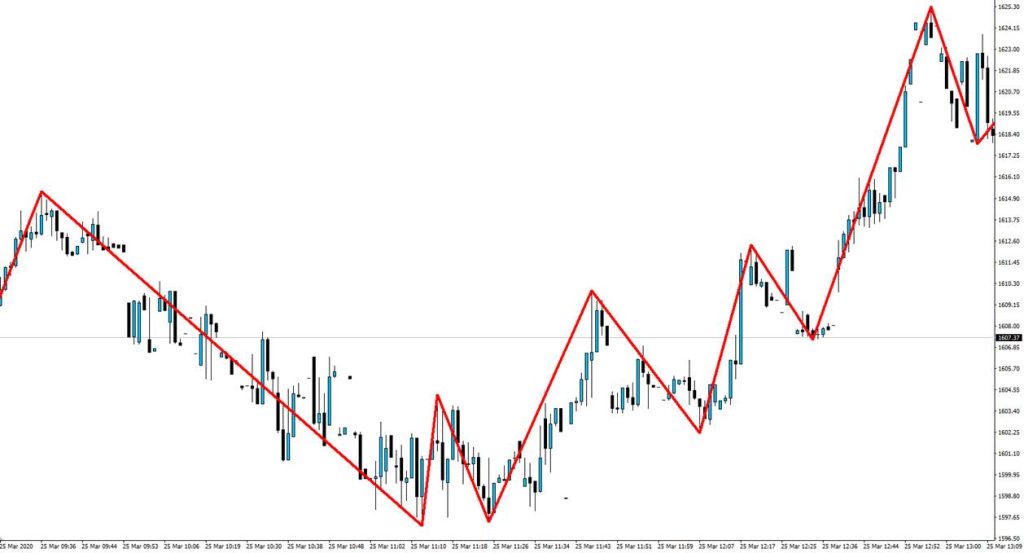
ZigZag Arrow Indicator for MT4
The ZigZag Arrow Indicator for MT4 filters out minor price fluctuations and highlights major swings, helping traders identify trends, reversals, and support or resistance levels with clarity.
Download the ZigZag Arrow Indicator for MT4ZigZag Arrow Indicator for MT4 Free Download
The ZigZag Arrow Indicator for MT4 is one of the most widely used MetaTrader 4 indicators for identifying significant price movements while filtering out market “noise.” By drawing lines based on predefined price shifts, it highlights meaningful swings and simplifies trend recognition. For Forex traders, this indicator makes it easier to visualize patterns, track reversals, and plan trades with confidence.
This guide covers everything you need to know about using the ZigZag Arrow Indicator in MT4, including its functions, settings, advantages, and how to combine it with other trading tools.
What Is the ZigZag Arrow Indicator?
The ZigZag Arrow Indicator reduces market clutter by focusing only on major price swings. When the market shifts direction by a set percentage, the ZigZag line adjusts, creating a clear visual representation of price action. This makes it valuable for identifying overall trends, potential reversals, and support or resistance levels.
Unlike indicators that constantly fluctuate with every tick, the ZigZag prioritizes significant movements, providing traders with a cleaner chart and easier decision-making process.
Why Use the ZigZag Indicator in MT4?
In fast-moving markets, traders can be misled by false signals caused by minor price changes. The MT4 ZigZag Indicator helps avoid this by filtering out smaller fluctuations and displaying only important swings. Its simplicity makes it suitable for both beginners learning technical analysis and advanced traders refining strategies.
By highlighting trends clearly, the ZigZag Indicator helps traders focus on what matters most: identifying the direction of the market and anticipating key turning points.
Key Features of the ZigZag Arrow Indicator
-
Noise Reduction: Filters out minor fluctuations to reveal meaningful moves.
-
Flexible Parameters: Adjustable settings for depth, deviation, and backstep to fit different strategies.
-
Visual Clarity: Highlights major highs and lows with arrows and lines for simple chart interpretation.
-
Multi-Timeframe Use: Works on short- and long-term charts for day trading, swing trading, and position trading.
How the ZigZag Indicator Works
The indicator connects swing highs and lows once a specified price threshold is reached. Traders can adjust three main settings:
-
Depth: Minimum number of bars between two points.
-
Deviation: Minimum percentage change required for a new swing.
-
Backstep: Prevents peaks or troughs from forming too close together.
When these conditions are met, the indicator recalculates, drawing a new line and marking the change with arrows. This creates a cleaner chart that reflects only the most significant market moves.
Advantages and Limitations of the ZigZag Indicator
Advantages
-
Makes trend identification clearer and easier
-
Highlights support and resistance levels effectively
-
Works across all timeframes and strategies
Limitations
-
Not predictive—it reflects past price action, making it a lagging tool
-
Requires parameter adjustments to suit changing market conditions
For this reason, many traders use the ZigZag alongside oscillators like RSI or trend indicators like moving averages to strengthen reliability.
How to Use the ZigZag Indicator in Trading
-
Trend Identification: Recognize whether the market is trending upward, downward, or sideways.
-
Support and Resistance: Use the swing points identified by the indicator to mark key zones.
-
Reversal Detection: Spot potential turning points by combining ZigZag arrows with momentum indicators for confirmation.
Customizing the ZigZag Arrow Indicator
Traders can improve accuracy by adjusting the indicator’s settings. Smaller deviation values capture more movements, while larger ones filter out noise and focus only on big shifts. Depth and backstep can also be modified to refine chart signals. Testing different combinations in demo accounts helps determine the best setup for each market condition.
Practical Tips for the MT4 ZigZag Indicator
-
Combine it with other MetaTrader 4 indicators for confirmation
-
Backtest settings before applying them in live markets
-
Focus on liquid sessions for more reliable results
Final Thoughts on the ZigZag Arrow Indicator for MT4
The ZigZag Arrow Indicator remains a valuable MetaTrader 4 tool for simplifying technical analysis. While it does not predict future price action, it provides a clear picture of market structure, helping traders identify trends, reversals, and key levels. When combined with other MT4 indicators, it becomes even more effective as part of a complete trading strategy.
- InpDepth (default 12) — Minimum number of bars between reversal points; controls how many swing highs/lows the underlying ZigZag calculation considers.
- InpDeviation (default 5) — Minimum price deviation, in points, required for a new swing to register.
- InpBackstep (default 3) — Minimum number of bars required between two consecutive swing points of the same type.
- ArrowUp (default Blue) — Color of the arrow marking a bullish reversal point.
- ArrowDown (default Red) — Color of the arrow marking a bearish reversal point.
FAQs About the MT4 ZigZag Arrow Indicator for MT4
What does the ZigZag Arrow Indicator do in MetaTrader 4?
It highlights major price swings by filtering out minor fluctuations, making it easier to identify trends, reversals, and support or resistance levels.
Is the ZigZag Arrow Indicator for MT4 free to download?
Yes. It is available as a free download and can be installed directly into the MetaTrader 4 platform.
How do I install the ZigZag Arrow Indicator in MT4?
Download the file, open MT4, go to File > Open Data Folder, and place it in the Indicators folder. After restarting MT4, it will appear in the Navigator panel.
Can I customize the ZigZag Arrow Indicator?
Yes. Traders can adjust parameters like depth, deviation, and backstep to refine how the indicator identifies swing highs and lows.
What are the advantages of using the ZigZag Indicator?
It improves trend recognition, reduces chart noise, and provides clear visual cues for market structure across multiple timeframes.
What are the limitations of the MT4 ZigZag Indicator?
It is a lagging tool, meaning it responds to price action rather than predicting it, and it requires adjustments to settings based on market conditions.