
Categories
Auto MACD Indicator for MT5
The Auto MACD Indicator for MT5 is a free, custom-built upgrade to the standard MACD oscillator, designed to give traders clearer signals and more actionable insights. Available for both MetaTrader 5 and MetaTrader 4, this indicator enhances traditional MACD functions with color-coded histograms and cloud-based moving averages that highlight entry points with greater precision.
In today’s fast-paced Forex market, standard indicators often fall short due to increased participation, high-frequency trading, and automated systems. The Auto MACD addresses these limitations by providing more visually intuitive signals, making it easier for traders to keep up with changing conditions.
Why Use the Auto MACD Indicator?
The traditional MACD is a classic tool, but its single histogram and simple EMA structure can sometimes leave traders struggling to filter out noise. The Auto MACD was developed to solve this problem by adding more visual cues and enhancing the indicator’s responsiveness. Here is what sets it apart:
-
Color-coded histogram: Volumes are displayed in four colors, helping you quickly distinguish between bullish and bearish pressure.
-
Dynamic cloud design: The fast and slow EMAs form a color-shifting cloud, creating an easy-to-read visualization of trend direction.
-
Clear entry signals: Buy and sell conditions are easier to identify, making it a practical tool for both beginner and experienced traders.
-
Adaptability: Suitable for intraday, swing, and long-term trading strategies.
By dividing bullish and bearish histogram volumes, the Auto MACD offers more detailed insights than the standard version, allowing traders to act with greater confidence.
How to Trade with the Auto MACD Indicator
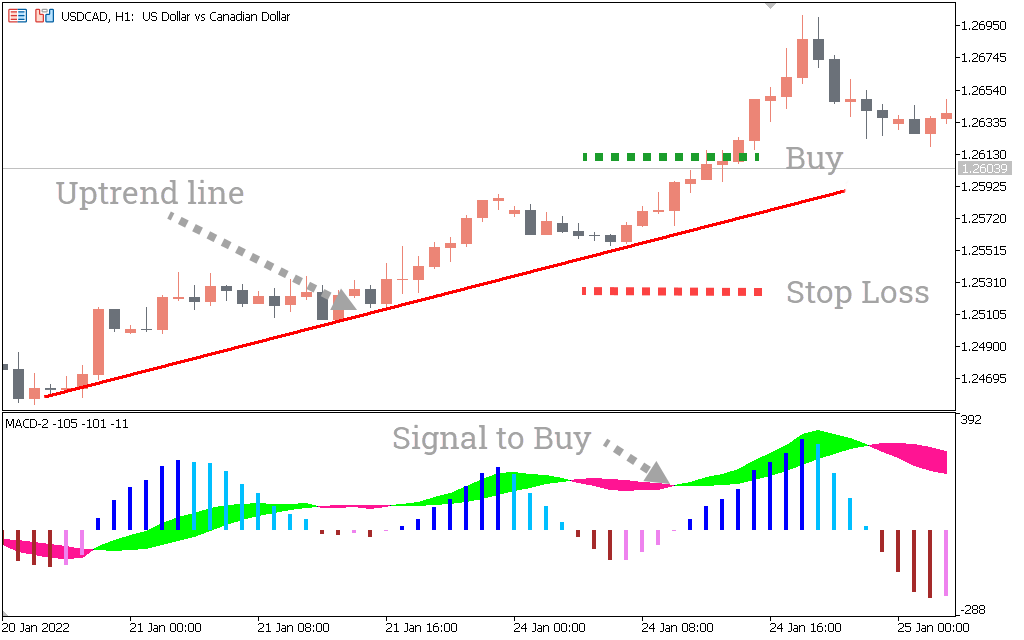
The Auto MACD can be used across different timeframes and trading approaches. Below is an example of how it can be applied to a buy setup on the H1 chart.
-
Look for bullish histogram colors: Blue or light blue bars suggest bullish momentum.
-
Confirm trend direction: Use a trendline or moving average to ensure you are trading with the broader trend.
-
Wait for the cloud signal: When the EMA cloud turns bullish in color, it signals favorable conditions.
-
Enter the trade: Place a buy order once the above conditions align.
-
Stop-loss placement: Place your stop-loss just beyond the trendline or a recent swing low.
-
Exit strategy: Close your trade when the indicator reaches overbought conditions or when histogram colors shift bearish.
Sell Example
For short trades, the same logic applies but with bearish signals:
-
Histogram bars turn violet or brown.
-
The cloud shifts bearish.
-
Trendline confirmation supports a downward move.
-
Place stop-loss above recent highs and take profit when momentum weakens.
Key Features of the Auto MACD Indicator
-
Enhanced visual clarity: Makes identifying entry points faster and easier.
-
Multi-timeframe utility: Works on anything from M5 to D1 charts.
-
Volume-based insights: Divides bullish and bearish activity, giving traders a more complete view.
-
Free download: Available for both MT5 and MT4 with no cost to the trader.
Benefits of the Auto MACD Over the Standard MACD
-
More accurate reflection of bullish and bearish pressure.
-
Additional trade confirmation through color-coded signals.
-
Better suited for modern market conditions influenced by algorithms and bots.
-
Greater flexibility across different strategies, including scalping, swing trading, and trend following.
Who Should Use the Auto MACD Indicator?
The Auto MACD is suitable for traders at all levels:
-
Beginners: Easy-to-read signals and visual cues make it less intimidating than more complex systems.
-
Intermediate traders: Ideal for those looking to refine entry timing and avoid false signals.
-
Experienced traders: Can be used in combination with other tools such as support and resistance, Fibonacci levels, or price action strategies.
Whether you are focusing on short-term trades or managing long-term positions, the Auto MACD is versatile enough to fit seamlessly into your toolkit.
Conclusion
The Auto MACD Indicator for MT5 is a powerful improvement on the standard MACD oscillator. By adding color-coded histograms and a cloud-based EMA visualization, it makes spotting trends, reversals, and entry points far easier. This user-friendly upgrade is perfect for traders who want reliable, visual signals without sacrificing depth of analysis.
You can download the Auto MACD for free and start integrating it into your MetaTrader platform today to improve clarity and confidence in your trades.
The indicator’s settings include only the most essential parameters – the periods of moving averages. Depending on your trading approach, you can choose the periods of EMA that allows for the most efficient signals of the indicator in your trading system.

FastMACD: allows you to select the period of a fast moving average.
SlowMACD: enables you to select the period of a slow moving average.
SignalMACD: allows you to select the period of a signal moving average.
PriceMACD: determines the price (open, high, low, and close) to be considered for performing the calculation.
Having downloaded and installed the indicator, you’ll need to spend some time customizing the periods of the moving averages.
Don’t neglect the above said issues: you’ll ultimately increase your chances of making profitable and reliable trades, if you make use of the MACD-2 indicator along with your main trading system or other indicators.
FAQs About the MT4 Auto MACD
What is the Auto MACD Indicator for MT5?
The Auto MACD is an enhanced version of the traditional MACD oscillator, built for MetaTrader 5. It improves trade timing by using color-coded histograms and a cloud-based EMA system to provide clearer entry and exit signals.
How does the Auto MACD differ from the standard MACD?
The standard MACD provides a single histogram and EMA, while the Auto MACD separates bullish and bearish momentum with four histogram colors and a trend-following cloud. This makes the signals more intuitive and precise.
Can I use the Auto MACD on MT4?
Yes. While designed for MT5, the Auto MACD is also available for MetaTrader 4, making it accessible to traders who prefer the MT4 platform.
Which timeframes work best with the Auto MACD?
The indicator is versatile and works across all timeframes. Short-term traders may use it on M5 or M15 charts, while swing and position traders may prefer H1, H4, or daily charts.
Is the Auto MACD suitable for beginners?
Yes. The clear color-coded signals and simple visual layout make it user-friendly for beginners while still being advanced enough for experienced traders.
Does the Auto MACD repaint signals?
No, once signals are generated, they remain fixed on the chart, making the indicator reliable for both live trading and backtesting.
How should I use the Auto MACD with other indicators?
The Auto MACD works best when combined with trendlines, moving averages, or support and resistance levels. Pairing it with other confirmation tools improves accuracy and helps filter out false signals.
Auto MACD
The Auto MACD Indicator for MT5 is a free and improved version of the standard MACD, offering color-coded histograms, cloud-based EMA visualization, and reliable entry points for Forex traders.
Download the Auto MACD