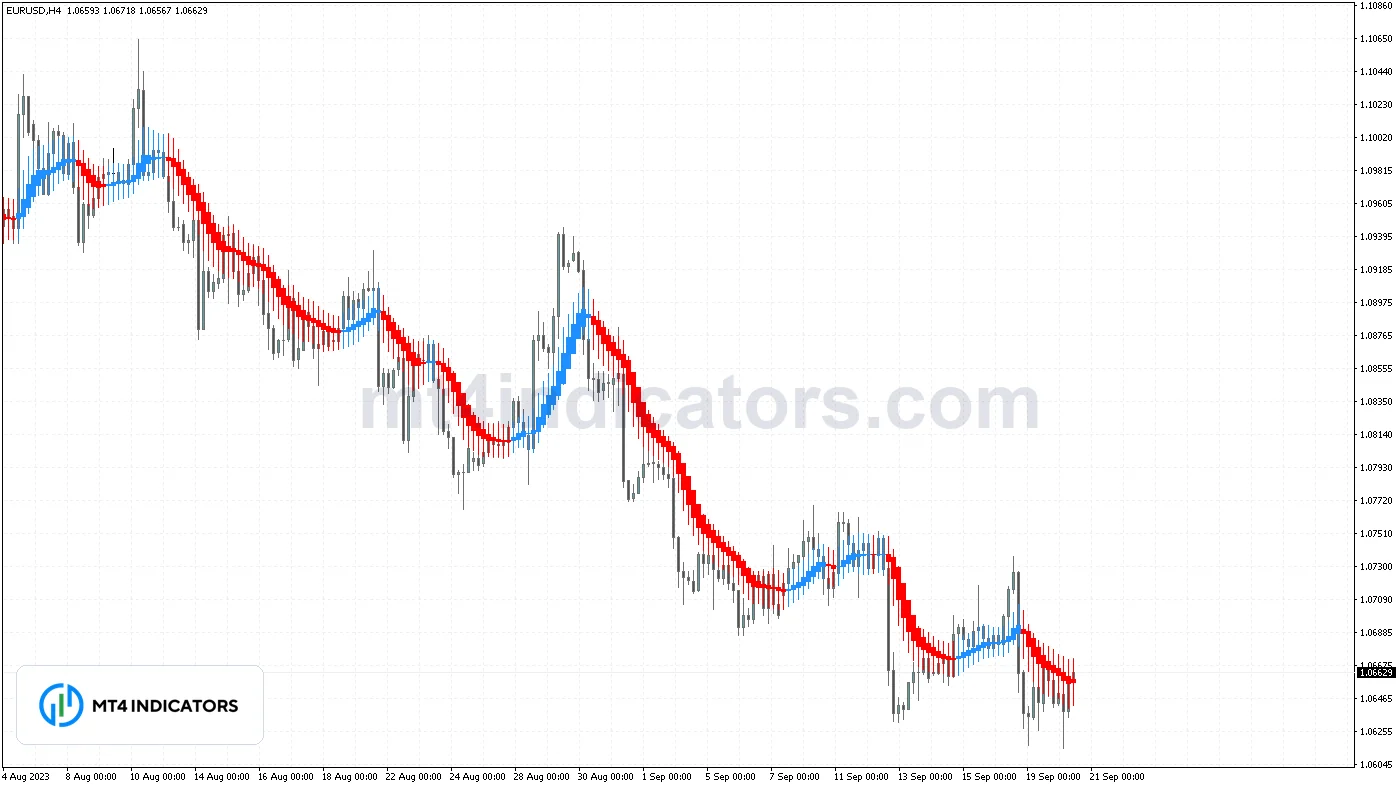
The Heiken Ashi Smoothed indicator for MT4 draws filtered candles over your price chart that change color only when the underlying trend shifts. It smooths price with a moving average, builds Heiken Ashi candles from the result, then smooths those candles a second time, so short pullbacks and noise rarely flip the color.
Standard Heiken Ashi candles already average price, but they still flicker in choppy markets. The smoothed version adds two moving-average passes to cut that noise further. This free MetaTrader 4 indicator follows that classic recipe and lets you choose the type and period of both averages.
What Is the Heiken Ashi Smoothed Indicator?
Heiken Ashi (also spelled Heikin Ashi) means “average bar” in Japanese. Instead of plotting raw open, high, low and close prices, it plots averaged values, which makes runs of same-colored candles more common in trends. The smoothed version applies a moving average before and after the Heiken Ashi step. The result is a trend filter that reads like candles: blue candles while the smoothed trend points up, red candles while it points down.
The indicator draws on top of your normal chart. Many traders switch the chart to line mode or set the regular candles to the background color so only the smoothed candles show.
How it is calculated
- First smoothing. The indicator takes a moving average of Open, High, Low and Close separately, using MaMethod1 and MaPeriod1 (6-period Smoothed MA by default).
- Heiken Ashi step. From those averages it calculates:
- HA close = (MA open + MA high + MA low + MA close) / 4
- HA open = (previous HA open + previous HA close) / 2
- HA high = the highest of MA high, HA open and HA close
- HA low = the lowest of MA low, HA open and HA close
- Second smoothing. Each of the four HA values is averaged again with MaMethod2 and MaPeriod2 (2-period Linear Weighted MA by default).
- Drawing. When the smoothed close is above the smoothed open, the candle is drawn in BullColor; otherwise it is drawn in BearColor. The wick runs from the smoothed low to the smoothed high, and the body from the smoothed open to the smoothed close.
The candles are drawn with four histogram buffers in the main chart window, the same way MT4’s standard Heiken Ashi indicator draws its candles.
Key Features
- Two independent smoothing passes with selectable MA type and period.
- Fewer color changes than regular Heiken Ashi, which helps you stay with a trend.
- Custom bull and bear colors, wick width and body width.
- Values available in the Data Window and through iCustom for use in an Expert Advisor.
- Efficient calculation: after the first load, only the newest bar is recalculated.
How to Trade With the Heiken Ashi Smoothed Indicator
Because it lags by design, the indicator works best as a trend filter and exit tool, with entries timed on the regular chart.
Buy rules
- Wait for the smoothed candles to turn from red to blue, and for the color to hold when that candle closes.
- Confirm with the higher timeframe. For example, trade H1 color changes only in the direction of the H4 smoothed candles.
- Enter on the next bar, or on a small pullback that does not turn the candles red again.
- Place the stop below the most recent swing low, or below the low of the smoothed candle.
- Stay in while the candles remain blue. A switch to red is the exit signal.
Sell rules
Reverse the rules: a blue-to-red change on a closed candle, agreement from the higher timeframe, a stop above the recent swing high, and an exit when the candles turn blue again.
Reading candle shape
Smoothed candles with long bodies and little or no wick on the trend side show steady momentum. Shrinking bodies and wicks on both sides suggest the trend is slowing, which can be a cue to tighten your stop before the color actually changes. Pairing the indicator with a separate trend-strength tool such as the Advanced ADX indicator helps you skip color changes in flat markets.
Best Settings
- Default (6 SMMA, then 2 LWMA): a balanced setting for H1 to D1 swing trading.
- Smoother and slower: MaPeriod1 10 to 14 with the same second pass, for longer trends with fewer flips.
- Faster: MaMethod1 EMA with MaPeriod1 3 to 4 for quicker color changes on M15 to H1, at the cost of more false flips.
- Single smoothing: set MaPeriod2 to 1 to turn off the second pass.
To see only the smoothed candles, press F8 to open the chart properties, go to the Colors tab, and set Bar Up, Bar Down, Bull candle, Bear candle and Line graph to the same color as the chart background. Your regular price data stays on the chart; it simply blends into the background so the smoothed candles stand out.
Every extra bar of smoothing adds lag, so color changes come later than on regular candles. That is the trade-off for fewer whipsaws.
Does It Repaint?
No. Heiken Ashi Smoothed is non-repainting. Every value uses the current bar and earlier bars only, and closed candles are never recalculated. The candle that is still forming changes with each tick, so its color can switch back and forth until it closes. That is why the rules above wait for a closed candle. The indicator does lag, which is different from repainting: lag means signals come late, while repainting means past signals change. Our guide on repainting covers this in more detail.
How to Install
Download the free file, then in MetaTrader 4 open File > Open Data Folder > MQL4 > Indicators and copy heiken-ashi-smoothed-indicator-mt4.mq4 into that folder. Restart the terminal or right-click Indicators in the Navigator and choose Refresh, and the indicator compiles and appears under Indicators > Custom. Drag it onto a chart and adjust the inputs in the window that opens. The full walkthrough, with fixes for common problems, is in our guide on how to install indicators in MT4. This is an MT4 file, so it will not load in MetaTrader 5 (the two platforms use different file formats), and the MT4 mobile apps cannot run custom indicators at all, as explained in our MT4 mobile indicators guide.
Related Indicators
- 4 Time Frame Heiken Ashi Indicator MT4 to check Heiken Ashi direction on several timeframes at once.
- Heiken Ashi Zone Trade Indicator MT5 for MetaTrader 5.
- SuperTrend Indicator MT4 for an ATR-based trailing stop that pairs well with smoothed candles.
- Fractal Adaptive Moving Average (FRAMA) Indicator MT4 for an adaptive trend line.
Browse every trend trading indicator on the site.
Trading on margin carries a high level of risk, so test any new tool on a demo account before you use it with real money.