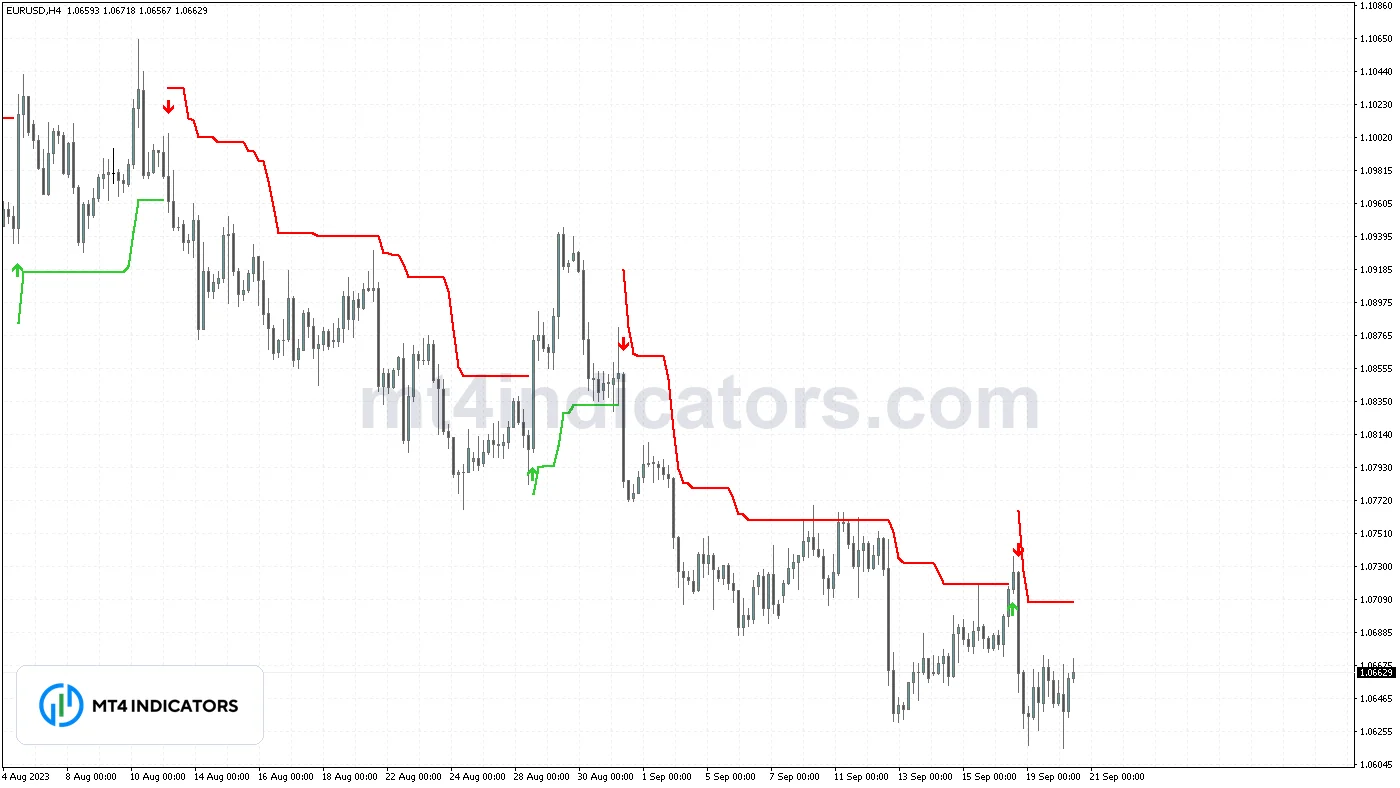
The SuperTrend indicator for MT4 plots a single trailing line that sits below price in an uptrend and above price in a downtrend, switching sides when a candle closes through it. The line is green while the trend is up and red while it is down, and optional arrows and alerts mark each flip on a closed candle.
SuperTrend is popular because it does two jobs at once: it tells you the current trend direction, and it gives you a volatility-based trailing stop. MetaTrader 4 does not include it, so this free indicator adds it with clean code, closed-candle arrows and mobile push alerts.
What Is the SuperTrend Indicator?
SuperTrend is built on the Average True Range (ATR), a measure of how much price typically moves per bar. It places a band a set number of ATRs above and below the middle of each candle. In an uptrend, only the lower band is shown and it can only move up. In a downtrend, only the upper band is shown and it can only move down. When price closes on the wrong side of the active band, the trend flips and the line jumps to the other side.
How it is calculated
- For each bar, the midpoint is (high + low) / 2 and the ATR uses ATRPeriod bars.
- Basic upper band = midpoint + Multiplier × ATR. Basic lower band = midpoint − Multiplier × ATR.
- The final upper band only moves down: it takes the new basic upper band if that is lower than the previous final upper band, or if the previous close was above the previous final upper band. Otherwise it keeps its previous value.
- The final lower band only moves up, by the mirror rule.
- The trend flips from up to down when a close falls below the previous bar’s final lower band, and from down to up when a close rises above the previous bar’s final upper band.
- While the trend is up the indicator draws the final lower band in UpColor; while it is down it draws the final upper band in DownColor.
Buy and sell arrows, when ShowArrows is on, are drawn half an ATR below the low or above the high of the candle where the flip happened. Arrows only appear on closed candles.
Key Features
- Two-color trend line: green under price in uptrends, red over price in downtrends.
- Adjustable ATR period and multiplier.
- Buy and sell arrows on closed-candle flips only, so they never vanish.
- Pop-up and mobile push alerts once per flip, after the candle closes.
- Line and arrow values are buffers, readable in the Data Window or through iCustom in an Expert Advisor.
How to Trade With the SuperTrend Indicator
Trend-following entries
- Buy when a closed candle flips the line to green (a buy arrow appears). Sell when a closed candle flips it to red.
- Filter with a higher timeframe: for example, take H1 buy flips only while the H4 SuperTrend is green.
- Place the initial stop just beyond the SuperTrend line, with room for the spread.
- Trail the stop with the line as it moves. Exit when the trend flips the other way.
Pullback entries
Instead of entering on the flip, some traders wait for price to pull back toward a green line in an uptrend and enter when a bullish candle closes off it. The stop goes below the line, which keeps the risk smaller than an entry far from the line. The same applies in reverse for downtrends.
Reading the line between signals
The line carries information even when it is not flipping. A green line that keeps stepping up as price climbs shows a trend that is still extending. A line that stays flat for many bars means price has stopped making progress and the band is no longer being pulled along, which often comes before either a flip or a fresh push. A large gap between price and the line means your trailing stop is far away; some traders take partial profit there instead of giving back the whole move if the trend flips.
Avoiding choppy markets
Like any trend-following tool, SuperTrend gives back money when the market goes sideways and the line flips repeatedly. A trend-strength filter such as the Advanced ADX indicator or the Choppiness Index can keep you out of those periods. Smoothed candles from the Heiken Ashi Smoothed indicator are another way to confirm direction before acting on a flip.
Best Settings
- Default (10, 3.0): the widely used starting point, suited to H1 to D1 swing trading.
- Day trading (M15 to H1): ATRPeriod 10 with Multiplier 2.0 to 2.5 for quicker flips and tighter stops.
- Longer trends: raise Multiplier to 4.0 or more to stay in moves longer, accepting larger stops.
- Position sizing: the stop distance to the line changes with volatility, so calculate lot size per trade with the position size calculator.
A lower multiplier means more signals and more false flips; a higher one means fewer signals and later exits. Test changes on a demo account before using them live.
Does It Repaint?
No. Arrows and alerts are non-repainting: they are only created after a candle has closed, and closed bars are never recalculated. The line on the current, still-forming candle is live: if price crosses the band during the bar, the line can switch color on that bar and switch back before it closes. That is normal current-bar behavior and the reason arrows wait for the close. If you want to understand the difference, read our explanation of what repainting means.
How to Install
Download the free file, then in MetaTrader 4 open File > Open Data Folder > MQL4 > Indicators and copy supertrend-indicator-mt4.mq4 into that folder. Restart the terminal or right-click Indicators in the Navigator and choose Refresh, and the indicator compiles and appears under Indicators > Custom. Drag it onto a chart and adjust the inputs in the window that opens. The full walkthrough, with fixes for common problems, is in our guide on how to install indicators in MT4. This is an MT4 file, so it will not load in MetaTrader 5 (the two platforms use different file formats), and the MT4 mobile apps cannot run custom indicators at all, as explained in our MT4 mobile indicators guide.
Related Indicators
- SuperTrend Bar MTF Indicator MT4 to see SuperTrend direction across several timeframes.
- Parabolic SAR Signals Indicator MT4, another trailing-stop style trend tool.
- NRTR Indicator MT4, a trailing reverse line based on recent price extremes.
- Donchian Channel Indicator MT4 for breakout levels to combine with SuperTrend direction.
Find more in the trend indicators section.
Trading on margin carries a high level of risk, so test any new tool on a demo account before you use it with real money.