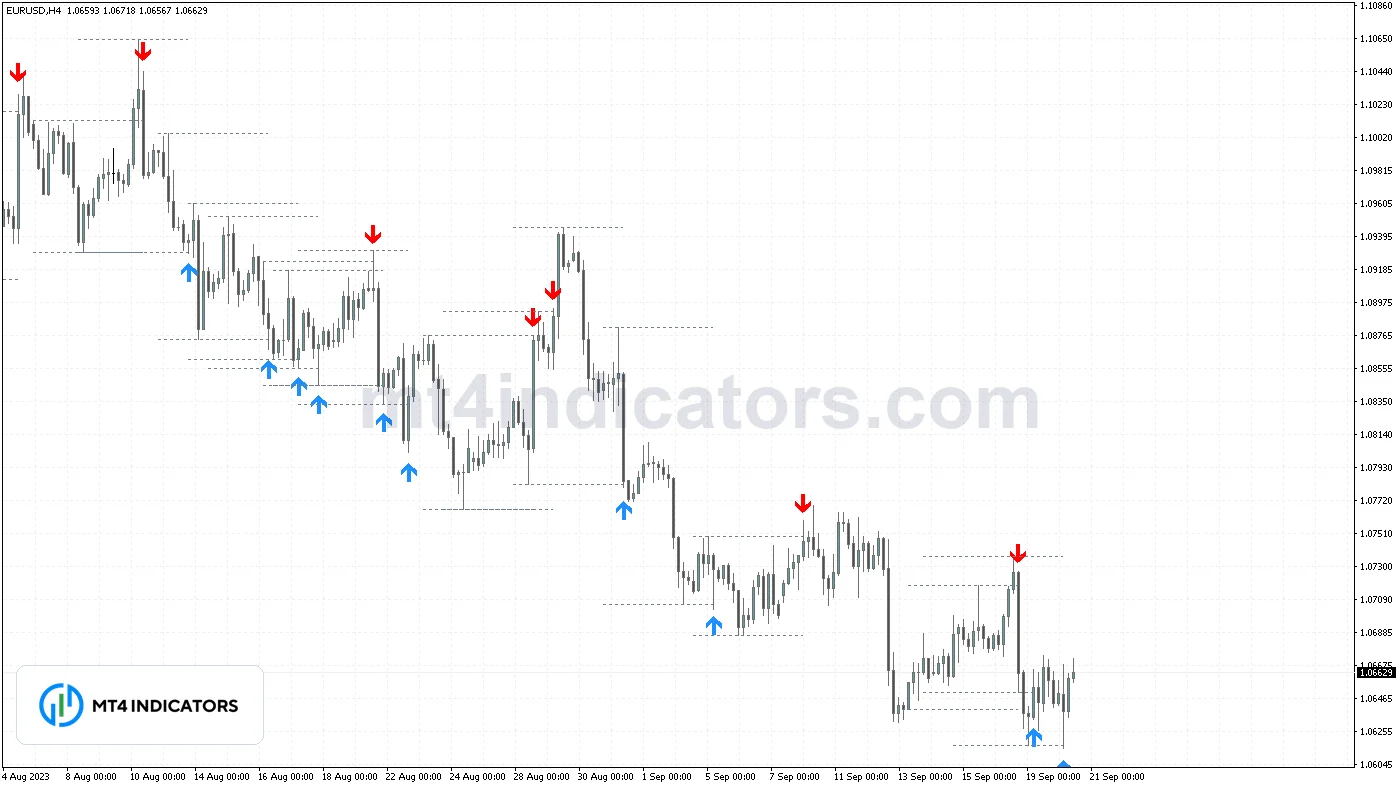
This false breakout indicator MT4 tool is a fakeout detector. It builds a range from recent candles, waits for price to trade beyond the range high or low, and marks the candle that closes back inside within a few candles. Down arrows mark failed breakouts, up arrows mark failed breakdowns, and arrows never move.
Fakeouts frustrate breakout traders, but they are also a setup in their own right. This free tool flags them with a fixed, testable rule instead of hindsight.
What Is a False Breakout?
A false breakout, or fakeout, happens when price moves beyond a clear level, such as the top of a range, and then quickly falls back inside instead of following through. A breakout that holds attracts more buyers or sellers in the breakout direction. A fakeout traps them on the wrong side.
Fakeouts often happen because obvious levels collect orders. Stop-loss orders from short sellers sit just above a range high, and breakout buy-stop orders sit there too. When price trades through the level, those orders fill. If there is no real demand behind the move once that liquidity is used up, larger participants can sell into it, and price drops back into the range. Traders often call this a stop run or liquidity grab. The same happens in reverse below a range low.
How the False Breakout Indicator MT4 Works
For every closed candle, the indicator checks three things:
- The range. It takes the highest high and lowest low of the RangeBars candles (20 by default) that come just before the signal window. The signal window is the last ConfirmBars candles (3 by default), ending with the candle being tested.
- The poke. A candle inside the signal window traded above the range high, or below the range low, by at least MinPokePoints. With the default of 0, any amount beyond the level counts.
- The close back inside. The candle being tested closed back inside the range, and it is the first candle to do so after the poke. If the poke candle itself closed back inside, that candle is the signal.
A bearish fakeout (failed breakout) gets a down arrow above the candle that closed back inside. A bullish fakeout (failed breakdown) gets an up arrow below it. If DrawRange is on, dotted segments show the range high and low from the start of the range to the signal candle, so you can see exactly which level failed.
To avoid several arrows for the same breakout, a new signal in one direction is skipped if there was already a signal in that direction within the previous ConfirmBars candles. A breakout that holds outside the range for longer than the window is treated as a real breakout and is not flagged.
Key Features
- Detects both failed breakouts above a range and failed breakdowns below it.
- Adjustable range length, confirmation window and minimum poke distance.
- Optional range segments that show the level that was broken.
- One signal per breakout, with no duplicate arrows on the following candles.
- Closed candles only: arrows appear when the signal candle closes and never move.
- Optional pop-up, sound and mobile push alerts.
How to Trade a False Breakout
Bearish fakeout (short)
- Wait for the down arrow. The candle has closed back below the range high after trading above it.
- Enter on the next candle’s open, or on a break of the signal candle’s low for extra confirmation.
- Place the stop a few pips above the highest wick of the fakeout. If price goes back above that wick, the idea is wrong.
- A first target is the middle of the range. A second is the range low on the other side.
Bullish fakeout (long)
- Wait for the up arrow after price dipped below the range low and closed back inside.
- Enter on the next candle or a break of the signal candle’s high, with the stop below the lowest wick of the fakeout.
- Target the middle of the range first, then the range high.
Because the stop goes beyond the wick, the distance can be wide after a long spike. Size every trade from the actual stop distance with the position size calculator, and check the pip value if you trade several pairs.
Filters that help
- Location: fakeouts at major levels matter more than fakeouts in the middle of nowhere. Major swing highs and lows from the Semafor indicator are a good reference.
- Momentum: a bearish fakeout while the Stochastic Momentum Index (SMI) is above +40 and turning down has more behind it than one in a neutral reading.
- Candle shape: a long rejection wick on the signal candle, the shape the Pin Bar indicator looks for, shows a clear rejection of the level.
- Session: range edges are often tested around session opens. The Trading Sessions indicator shows where each session starts.
False Breakout vs Real Breakout
| False breakout | Real breakout | |
|---|---|---|
| Close | Closes back inside the range within a few candles | Keeps closing beyond the level |
| Wick | Long wick beyond the level, body back inside | Strong body beyond the level |
| Retest | Old level fails to hold as new support or resistance | Old level often holds on a retest |
| Trade direction | Back into the range | In the breakout direction |
No indicator can tell in advance which breakout will hold. This one only marks the fakeout after price has already closed back inside, which is the moment you would have known. If you mainly trade breakouts, the Bollinger Squeeze Advanced indicator and the Steinitz Fractal Breakout indicator approach the same levels from the other side.
Best Settings
- RangeBars 20, ConfirmBars 3 (default): a balanced setting for M15 to H4.
- Longer RangeBars, such as 40 to 60: uses more significant highs and lows and gives fewer signals.
- ConfirmBars 1: only flags a candle that pokes beyond the range and closes back inside on the same candle, the classic rejection wick.
- ConfirmBars 4 to 5: also catches breakouts that hold for a few candles before failing.
- MinPokePoints: raise it, for example to 20 to 50 points on a 5-digit major pair, to ignore candles that only tick a hair past the level.
Does It Repaint?
No. Every part of the rule, the range, the poke and the close back inside, is checked on closed candles only. An arrow appears when the signal candle closes and stays there, and the range segments are drawn at the same moment. The live candle is never marked, even if it is currently back inside the range, because it could still close outside. See what repainting is for more.
How to Install
Copy “false-breakout-indicator-mt4.mq4” to File > Open Data Folder > MQL4 > Indicators, restart MT4 or refresh the Navigator, and drag it onto a chart. Arrows and range segments appear on the price chart. Full steps are in how to install indicators in MT4.
Related Indicators
- Inside Bar indicator marks tight ranges that often precede a breakout or a fakeout.
- Order Block indicator highlights zones where stop runs often start.
- Supply and Demand indicator adds zones for confluence.
Fakeout setups fail too, sometimes with a second push through the level. Trading on margin carries a high level of risk, so test this approach on a demo account first.