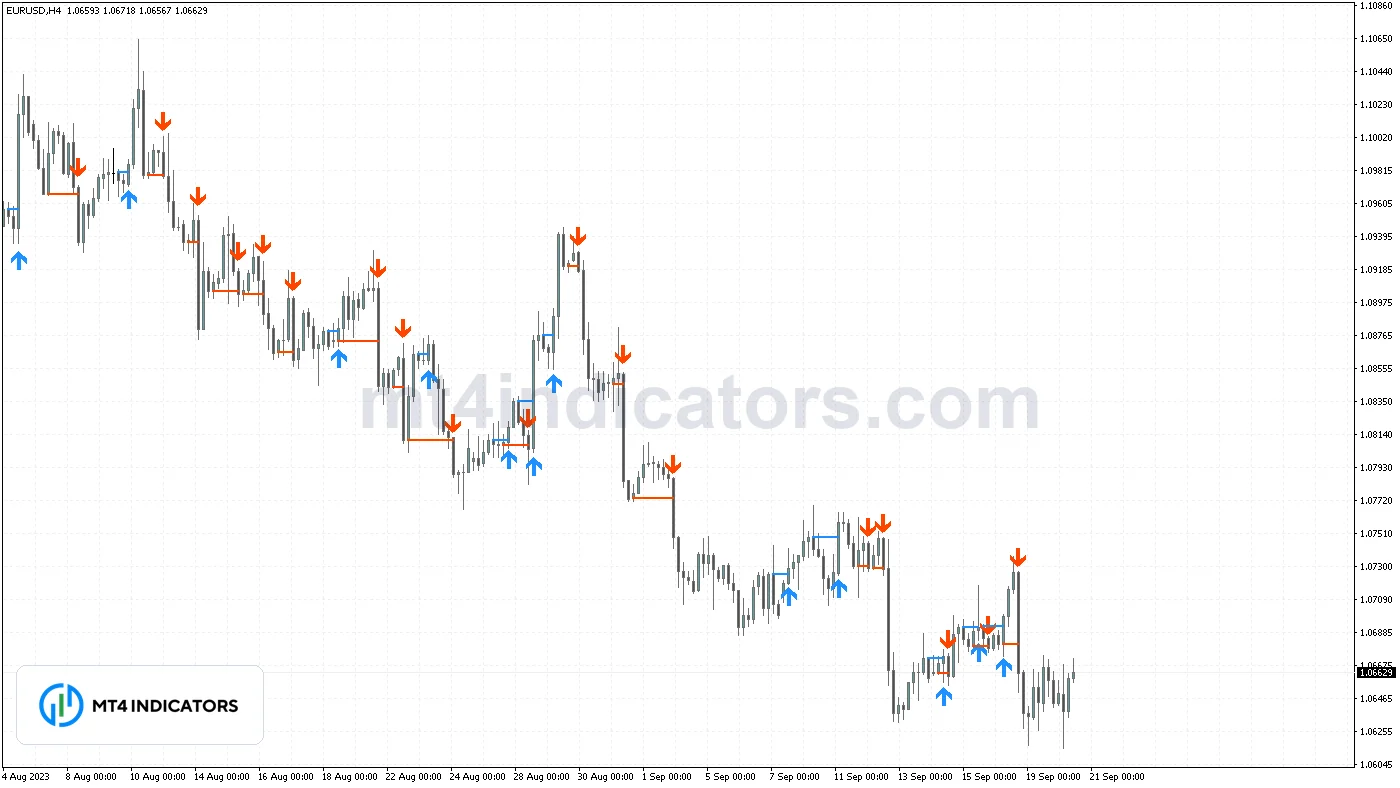
The CISD indicator for MT4 marks a Change in State of Delivery, the ICT signal that price has stopped moving one way and started moving the other. It fires when a closed candle closes beyond the opening price of the series of candles that delivered the last move. This free CISD indicator for MT4 draws a line at that opening price and an arrow on the confirming candle.
CISD is a small, precise idea, and it is easy to measure from the wrong candle when you do it by eye. The indicator uses one fixed rule on closed candles only, so every signal on your chart can be checked and nothing changes after the fact.
What Does CISD Stand For?
CISD stands for Change in State of Delivery. It is a term from ICT (Inner Circle Trader) concepts. “Delivery” describes the way price is being moved: a run of up-close candles is delivering price higher, and a run of down-close candles is delivering it lower. The state of delivery changes when price closes back beyond the point where that run began, which is the opening price of its first candle.
In CISD trading, that level matters because it is where the last leg started. If price can close back past it, the buyers or sellers who drove the last leg have lost control of it.
What Is the CISD Indicator?
The indicator watches every series of consecutive same-direction candles, remembers the opening price of the most recent qualifying series, and waits for a candle to close beyond it. When that happens it draws a horizontal line from the first candle of the series to the confirming candle, at the series’ opening price, and places an arrow on the confirming candle: a down arrow for a bearish CISD, an up arrow for a bullish one.
How the CISD Indicator MT4 Works
- Series: at least MinSeriesBars (2) consecutive up-close candles form a bullish series, and consecutive down-close candles form a bearish series. A candle that closes at its open ends any series.
- Bearish CISD: after a bullish series ends, a candle closes below the open of the first candle in that series. The candle that ends the series can be the confirming candle itself.
- Bullish CISD: after a bearish series ends, a candle closes above the open of the first candle in that series.
- Newest series wins: when a newer qualifying series in the same direction finishes, its opening price replaces the older level.
- Expiry: the confirming close must come within ExpiryBars (20) candles after the series ends. Set it to 0 to wait indefinitely.
- RequireSweep (optional): when true, a bullish series only counts if its high went above the highest high of the SweepLookback (10) candles before it, and a bearish series only counts if its low went below the lowest low of that window. This keeps CISDs that follow a liquidity grab and drops the rest.
Example walk-through
Here is a bearish CISD described in words, with round illustrative prices. Price has been rising, and three up-close candles in a row push it above a prior high. The first of those three candles opened at 1.0850. The next candle closes down, which ends the bullish series. It closes at 1.0862, still above 1.0850, so nothing happens yet. The candle after that closes at 1.0846, below the series’ opening price. That close is the bearish CISD: the indicator draws a line at 1.0850 from the first candle of the series to this candle and puts a down arrow above it. With RequireSweep on, the signal only counts because the series traded above the highest high of the ten candles before it.
CISD vs BOS and Market Structure Shift
CISD is often compared with a break of structure (BOS) and a market structure shift (MSS). They measure different things:
| Concept | Level that must be broken | What it tells you |
|---|---|---|
| BOS | A swing high or low, in the direction of the current trend | The trend is continuing |
| MSS | A recent swing high or low against the current direction, usually with displacement | Structure has turned |
| CISD | The opening price of the last series of same-direction candles | The delivery of the last leg has flipped |
Because the series’ opening price is usually closer to current price than the last swing, a CISD tends to appear earlier than an MSS. The trade-off is that it appears more often and fails more often. Many traders treat CISD as the first warning and wait for a structure break or displacement to confirm it.
Key Features
- Bullish and bearish CISD on closed candles, with a line at the series’ opening price and an arrow on the confirming candle.
- Adjustable minimum series length, expiry window and optional liquidity-sweep filter.
- Pop-up and mobile push alerts when a CISD candle closes.
- After the first load, only new closed candles are processed.
- All objects use the prefix MT4I_CISD_ and are removed when you delete the indicator.
How to Trade With the CISD Indicator
CISD works best as part of a sequence rather than as a stand-alone entry.
Using CISD with displacement and fair value gaps
- Mark a liquidity level, such as a prior swing high, the previous day’s high, or a session high.
- Wait for price to trade through that level with a series of candles. Turning RequireSweep on helps here.
- Look for a bearish CISD that forms with a large-bodied candle. The Displacement Candle Indicator MT4 flags that kind of candle.
- If the move away leaves a fair value gap, wait for price to retrace into it. The Fair Value Gap Indicator MT4 marks the gap.
- Enter on the retrace with your usual confirmation, and place the stop above the sweep high.
- Target the next liquidity below, such as a prior swing low.
A bullish CISD trade is the mirror image: a sweep below a low, a close above the bearish series’ opening price, a retrace into the bullish gap, and a stop below the sweep low. Use the position size calculator to size the position from that stop.
Practical tips
- A CISD on a higher timeframe, such as H1 or H4, can set your bias, and a CISD on M5 or M15 in the same direction can time the entry.
- CISDs in the middle of a range with no sweep are common and easy to over-trade. RequireSweep filters many of them out.
- If a breaker zone forms after the CISD, the Breaker Block Indicator MT4 will mark it as a possible retest area.
Best Settings
- MinSeriesBars 2 (default): the closest match to how CISD is usually drawn by hand.
- MinSeriesBars 3: only longer runs count, so you get fewer, cleaner signals.
- RequireSweep true, SweepLookback 10 to 20: keeps only CISDs that follow a run through a prior high or low.
- ExpiryBars 5 to 10: only quick reversals count. Raise it, or set 0, if you want slower turns included.
Does It Repaint?
No. The CISD indicator only reads closed candles. A series is only known once a candle ends it, and the arrow and line are drawn when the confirming candle closes. Every price in the rule is fixed at that point, so a signal does not move or disappear afterwards. The forming candle is never marked, so in real time the arrow shows up at the close of the confirming candle, not during it. On reload the scan starts MaxBarsBack bars back, so the very first series in the window can differ from a live run. More background is in our guide on what repainting means.
How to Install
Copy cisd-indicator-mt4.mq4 to File > Open Data Folder > MQL4 > Indicators, restart MT4 or right-click Indicators in the Navigator and choose Refresh, then drag it onto a chart from Indicators > Custom. See how to install indicators in MT4 for the full steps. This is an MT4 file and will not run in MetaTrader 5.
Related Indicators
- Displacement Candle Indicator MT4 to confirm that the CISD came with real force.
- Fair Value Gap Indicator MT4 to find the gap left by the move after a CISD.
- Breaker Block Indicator MT4 for failed order blocks after a sweep and a structure break.
- Order Block Indicator MT4 for the last opposite candle before the move.
- ZigZag Arrow Indicator for MT4 to see swing highs and lows at a glance.
Trading on margin carries a high level of risk, so test any new tool on a demo account before you use it with real money.